Status
Server Status
Closed
Advance Server login is closed because the OB54 testing window has ended. The live global Free Fire update is OB55. This guide explains how login works when Garena opens the next testing window.
Last updated: September 2026 · Reviewed for OB54 · Independent informational site (not Garena)
Logging into the Advance Server means signing in through the installed testing APK with the same account used during registration, then passing account and activation verification before the beta environment loads. Access only works while the current OB cycle's server is online, so login can fail even with a correct account if the testing window is closed or under maintenance.
Install the latest Free Fire Advance Server APK for the current testing cycle before you attempt to log in. Older builds often fail account verification or cannot reach the active beta environment after a new OB window opens.
Complete registration for the active cycle when registration is required, and keep the same supported account ready. Advance Server access is usually tied to the account used during registration, not a new or guest profile created at login.
Confirm that the testing period is open and that your connection is stable. Login can fail outside the official window, during maintenance, or when the first-launch resources did not finish downloading after install.
Check these basics before signing in to the Free Fire Advance Server.
Follow these steps after the Advance Server APK is installed. Exact screens can vary by release and login method.
Launch the installed Advance Server app and wait for the initial loading screen to finish.
Choose the same supported login method used during registration for the current cycle.
Complete sign-in with the registered account. Do not switch to a different or guest profile.
Allow the app to verify eligibility, activation status, and server availability for your account.
When verification succeeds and the server is online, continue into the testing environment.
Always use the same account that was registered for the current Advance Server cycle. Switching accounts at login is one of the most common reasons players see failed access even after a successful install.
Supported login methods can change by testing cycle. Follow the options shown in the Advance Server app and match them to the method used during registration whenever possible.
Guest accounts are often unsupported for Advance Server access. If the beta program expects a registered Facebook, Google, or other linked account, guest login will not unlock the testing environment.
Account eligibility still depends on Garena's selection rules for the current beta program. Installing the APK alone does not guarantee login if your account was not approved for that cycle.
These are the login issues players hit most often when entering the Advance Server.
Check your APK version, account match, activation status, and server availability — any one of these can block login.
Login can fail when the APK is outdated, the account does not match registration, activation is incomplete, or the server is offline for the cycle.
Learn MoreRetry with the exact registered account — a different linked account or expired session usually causes this.
Wrong password, expired session, or signing in with a different linked account can block access. Retry with the registered account credentials.
Learn MoreComplete activation first — many cycles require a code after install before login succeeds.
Many testing cycles require an activation code after install. Complete activation before expecting a successful Advance Server login.
Learn MoreWait and retry later — high traffic at testing-window launch commonly causes temporary delays.
High traffic at the start of a testing window can delay login. Wait and retry instead of repeatedly forcing sign-in attempts.
Learn MoreWait for the official reopening — login will not work while the Advance Server is under maintenance.
Official maintenance windows take the Advance Server offline. Login will not work until the testing environment reopens.
Learn MoreSwitch to a stable connection — unstable Wi-Fi or VPNs often interrupt account verification.
Unstable Wi-Fi, VPN issues, or interrupted first-launch downloads can break account verification. Switch networks and retry on a stable connection.
Learn More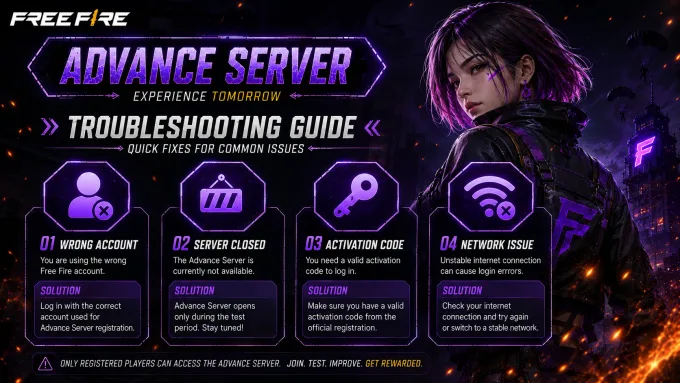
Advance Server environments are not always online. Servers may stay offline before a testing window opens, reopen only for a limited period, or close again when the cycle ends.
Maintenance windows are normal during beta testing. During maintenance, login attempts usually fail even if your APK, registration, and activation are all correct.
Login outside the official testing period often fails with unavailable, busy, or maintenance-style messages. Always confirm the current schedule before troubleshooting your account.
Check the latest announcements on our Latest OB Update page and related guides so you know whether the server is open, under maintenance, or waiting for the next cycle.
Closed
V68.54.0
2026-06-18
September 2026
Never share your Free Fire login credentials, OTPs, or account recovery details with anyone claiming they can unlock Advance Server access.
Avoid unofficial login tools, credential fillers, and third-party “instant access” apps. These tools increase account-theft risk and often fail official Advance Server checks.
Download the Advance Server APK only from trusted sources that identify the current version and testing cycle, then keep your linked account secure with normal platform protections.
Watch for phishing pages that copy registration or login branding. Confirm URLs carefully and never enter passwords on unknown websites promising free Advance Server entry.
Verification: Login and server availability fields on this page are synced with CURRENT_OB and reviewed whenever the testing window status changes.
This website is an independent informational guide. It is not operated by, affiliated with, or endorsed by Garena.
Download the latest APK, complete your registration, and use your approved account to join the current testing cycle.